 Whirlpick
Put your options on the wheel, spin, and take the answer it gives.
Decision Wheel for Choices You Keep Putting Off
A decision wheel is a spinning wheel that holds your options and picks one of them at random. It is also called a decision maker wheel, a choice wheel or a random picker for choices.
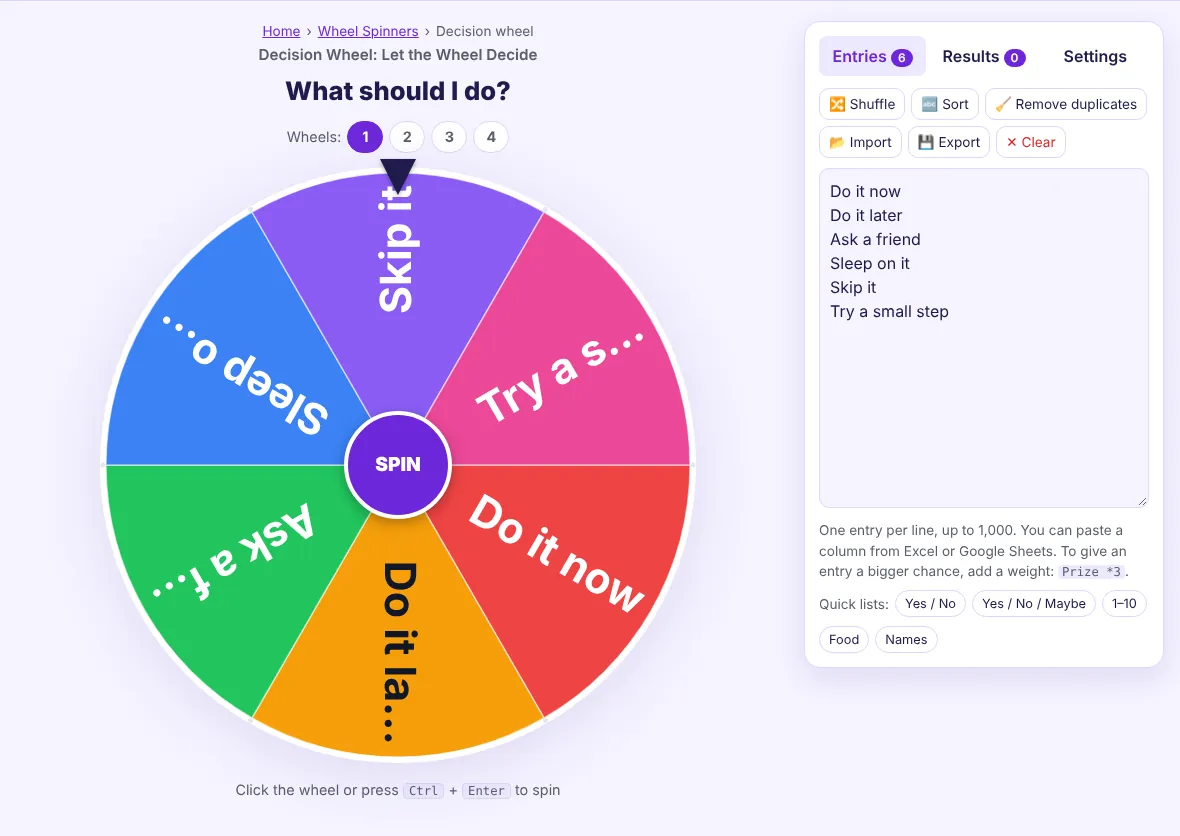
This decision wheel is free and needs no account. It opens with six sample answers, and each one has a 1 in 6 chance, about 16.7%, until you replace them with your own options.
A wheel is the right tool when every option on it is acceptable and the real problem is choosing. It ends the loop of comparing equal choices and lets you start.
How do you use the decision wheel?
You use the decision wheel by replacing the sample answers with your own options and pressing SPIN. The steps take under a minute.
- Write the question. Click the title above the wheel and type what you are deciding, up to 60 characters.
- List the options. Type one option per line in the entries box. Leave out anything you would refuse to do.
- Spin. Press SPIN, click the wheel, or press Ctrl + Enter.
- Accept or narrow down. Take the result, or press "Remove & close" to drop that option and spin again.
Here is a worked example. Type "Friday night?" as the title and enter Cinema, Bowling, Board games and Stay in. Four equal options give each a 25% chance. Spin, and the pop-up names one of them, for example Bowling.
How does the decision wheel decide?
The decision wheel decides by drawing a random stopping angle and reading the option under the pointer. The chance of an option is its weight ÷ the sum of all weights, so equal options share the wheel equally.
The angle comes from crypto.getRandomValues(), the secure random generator defined in the W3C Web Cryptography API. It is chosen before the animation starts.
No option is favoured by its position in the list or by earlier results. The same option can come up twice in a row, because each spin starts fresh.
When should you let a wheel decide?
You should let a wheel decide when the options are close in value and the cost of a wrong pick is small. The table separates good uses from poor ones.
| Decision | Wheel suitable? | Why |
|---|---|---|
| What to eat, watch or play | Yes | All options are fine; speed matters |
| Which task to start first | Yes | Starting beats comparing |
| Who does a chore this week | Yes | Random is seen as fair |
| Which job offer to accept | No | High stakes and unequal options |
| Anything involving health, money or safety | No | Needs facts and advice, not chance |
A spin can still help with a bigger choice in one way. If the result disappoints you, that reaction shows which option you wanted. Treat the wheel as a prompt in those cases, not as the decision.
Two-answer questions have their own page: the yes or no wheel starts with Yes and No.
This tool belongs to our all spinning wheels collection. Related tools: random colour wheel, mystery wheel spinner, random team generator.
How do you make one option more likely?
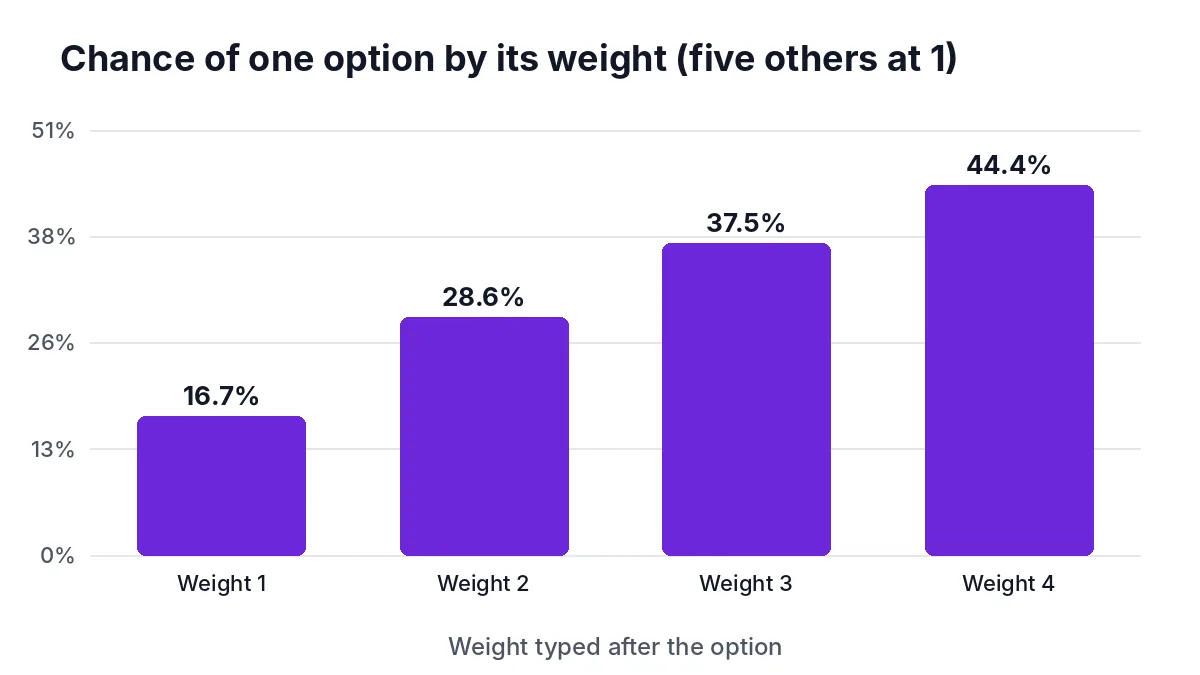
You make an option more likely by adding a weight after it. Type "Cinema *2" and that slice doubles in size.
With Cinema weighted 2 against three options at 1, the weights add up to 5. Cinema has a 40% chance and each other option 20%. Weights are useful when you lean one way but still want the others to have a real chance.
Press "Fairness test" on the Results tab to see the split in practice. The page runs 10,000 simulated spins and shows the expected and actual share of each option.
How can a group use the decision wheel?
A group can use the decision wheel by putting one option per person on it and spinning where everyone can see. Sharing a screen or using fullscreen mode keeps the result visible to all.
Elimination works well for groups. Spin, press "Remove & close" to drop the result, and repeat until one option is left; the last one standing wins. With four options that takes three spins.
Up to four wheels can run side by side. One wheel can choose the activity and a second the person who organises it, and "Spin all" turns both at once.
Disclaimer: results are random and for convenience only. They are not legal advice, and this tool is not a regulated lottery, raffle or gambling service. Check the rules that apply to you before offering prizes.
Frequently asked questions
Is the decision wheel random?
Yes, the decision wheel is random. The stopping position comes from the browser's secure random generator, and options with the same weight have the same chance. The fairness test on the Results tab lets you check it.
How many options can I put on the decision wheel?
You can put up to 1,000 options on the decision wheel. For a clear wheel, a handful of options works best. Labels shrink as the number of slices grows.
Can I save a decision wheel for next time?
Yes, you can save a wheel in this browser. Open Settings and press "Save current wheel". Your current list is also remembered automatically until you reset it.
What if I don't like the result?
You can spin again, but your reaction is useful information. Disappointment usually means you preferred another option. Remove the result with "Remove & close" and spin for the rest if you want a second pick.
Popular wheels
🎡 Spin the wheel
Spin a wheel with names, prizes or any choices.
🙋 Name wheel
Put names on a wheel and spin to choose one person.
📋 Random name picker
Draw one or several names from a list, with no repeats.
🍀 Lucky wheel
Set prizes and odds, see each chance, and spin for a prize.
🎨 Color wheel
Spin for a random colour; each slice is painted in its colour.
🤔 Decision wheel
Put your options on the wheel and let it decide.
🎟️ Raffle wheel
Draw one or several raffle winners, with tickets as weights.
❓ Mystery wheel
Hide what is on the wheel until it stops.
✅ Yes or No wheel
Let the wheel answer any yes-or-no question.
🔢 Random number wheel
Spin to pick a random number in any range.
👥 Team picker
Split a list of names into random, fair teams.
🔤 Letter wheel
Spin for a random letter for games and lessons.
🎭 Truth or dare wheel
Spin for a random truth question or dare.
Other languages
العربية اردو हिन्दी Español Français Deutsch Português Bahasa Indonesia Türkçe Русский Tiếng Việt Nederlands